Organize your Overwatch tournament or league

Five starters, two substitutes per team and a best-of-five final? Set your roster sizes and series formats in Olympe. Players can link their BattleTag when they sign up. Teams play in custom lobbies, then can report their series score and the maps they played.

Discuss my Overwatch project

Tell us about your competition, your match formats and the dates you have in mind. We’ll reply by email or walk you through your event in a demo.

Start with Free Forever

Create your free account in a few minutes and go straight to your Olympe dashboard.

  • €0 for life · 1 active competition at a time
  • Up to 128 teams and 4 divisions · Up to 2 months of matches, excluding registration.
Overwatch official logo
The game
Discipline Overwatch · 5v5 & 6v6
Platforms PC, PlayStation, Xbox, Switch
Publisher / Studio Blizzard Entertainment
Olympe sheet
Formats Group stages, Swiss rounds and elimination brackets
Scores Entered by teams or tournament admins
Blizzard account Official Battle.net ID
Public website your-name.olympelegends.com
Official Overwatch website overwatch.blizzard.com
Formats & Rules

Tournament formats & series rules

Use one format throughout your competition or combine several within a division. For example, some teams can start in groups and others in a knockout bracket before the qualifiers meet in a final. You also set the number of starters and substitutes per team.

Available · A vs B Pools

Division championships & pools

As soon as the teams are added to a group, Olympe automatically creates all the matches in that group at once.

Pools & divisions · 5v5 or 6v6
Available

Single or double-elimination brackets

You can start with a bracket or use one after the group stage. Olympe automatically unlocks each match once both teams are known.

Single or double elimination · Playoffs
Series rule · Olympe scoring

Best of, First to or free format

Teams report their score in Olympe and select the maps they played. In a Best of or First to series, the format and final score determine how many maps they enter.

Best of, First to or free · Scores & maps
Available · Swiss rounds

Swiss rounds

Once the last score of the round is entered, Olympe automatically creates the matchups for the next round.

How it works & boundaries

What Olympe handles, and what your staff manages

In your Olympe space

Included for your Overwatch competitions

  • Manage team registrations in Olympe. Players or team captains can agree on a time for their match and book it. A competition admin can also set the match date.
  • Players and spectators can find the match schedule, standings, brackets and links to match streams on your competition website.
  • Score entry: teams play their matches in Overwatch. You choose whether teams or tournament admins enter scores in Olympe. Admins can correct a score reported by a team.
  • Export the team list as a CSV file. Request the full player list from your Olympe workspace and you’ll receive it by email within 48 hours.
Before you get started

Handled by your team

  • Teams can find their opponents’ contact details in their Olympe workspace and arrange a custom game in Overwatch. You let the teams know which rules to use in-game. We’re working on adding custom game codes to each match feed.
  • MMR, bans & map pool: Blizzard sync retrieves the BattleTag only (no automatic rank/MMR lookup). You share your map pool with teams outside Olympe and handle any hero bans. When teams report their result, they can select from all maps. We’re considering a map manager that would let you restrict that choice to your map pool.
  • Seeding & tie-breakers: your staff reviews and confirms the initial seeding, any competition-specific tiebreaker rules and which teams advance to the playoffs.
  • Free start & activation: 1 active competition at a time on Free Forever (up to 128 teams, up to 4 divisions, match phases ≤ 2 months excluding registration). Create your free account in a few minutes and go straight to your Olympe dashboard.
Support for your event
Does your tournament depend on a specific rule or feature?
We’ll check whether Olympe’s settings cover what you need and how we can help with setup. If your competition needs custom development, we’ll discuss what’s feasible, how long it would take and whether funding is needed.
Community discussion · alongside contact
Share ideas with other organizers
On Discord, swap tools and tips with other organizers and talk with our team about what works for you and what you wish you had when running competitions.
What web address can you use for your Overwatch competition?
With Free Forever, your site’s address ends in .olympelegends.com. To use your own domain name, request a custom quote.
Free Forever · €0your-name.olympelegends.com Custom quoteyour-name.com

Overwatch All For One runs its league on Olympe

Here’s a real example of an Overwatch league on Olympe. Season after season, Overwatch All For One runs multiple divisions and competition formats on its own branded site.
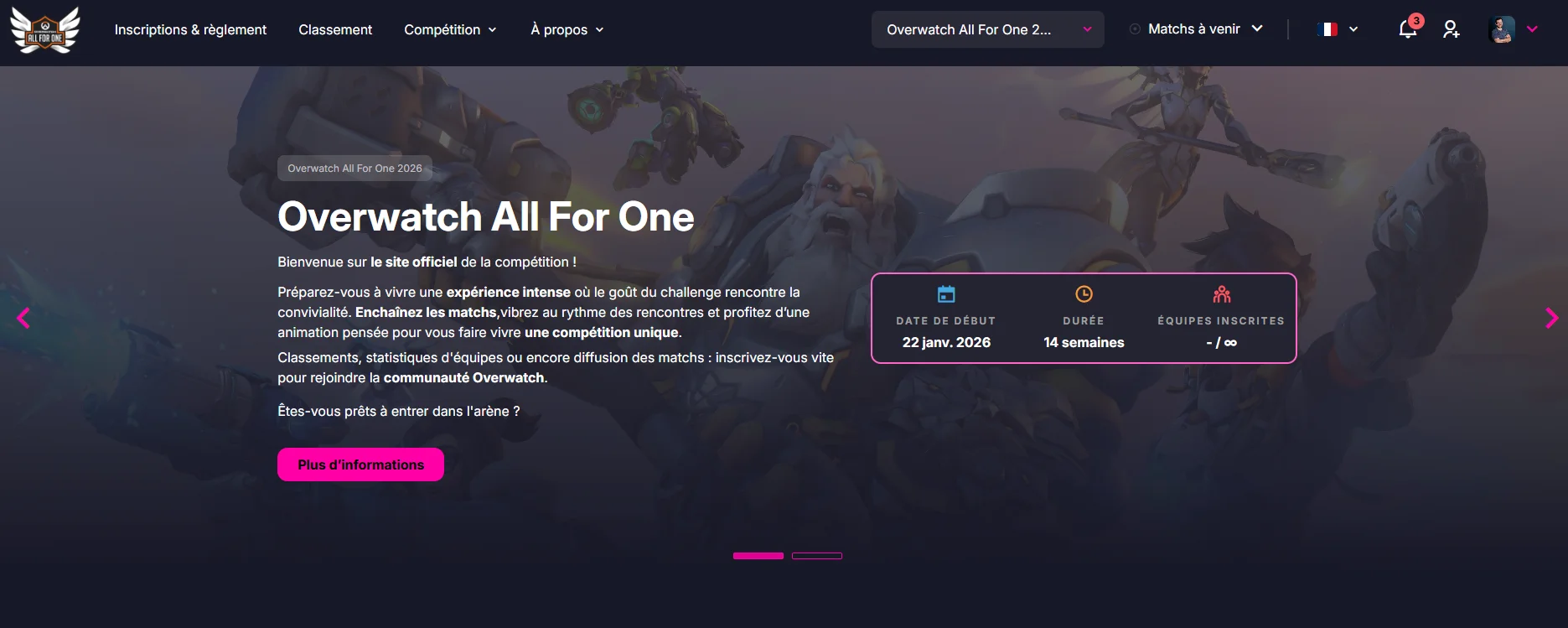
Live screenshot of the Overwatch All For One public portal powered by Olympe
Live Overwatch All For One public portal · Custom domain
Overwatch league · France

Overwatch All For One

“With Olympe, we’ve automated how we manage our seasons and divisions and keep track of our 6,000 players. That’s saved us valuable time that we can now spend on our community.”
League management · Overwatch All For One
Overwatch project

Tell us about your Overwatch competition

  • We’ll look at your competition rules with you to see what you can set up in Olympe, what your team handles in Overwatch and what needs a closer look.
  • You can request an email reply or a 30-minute demo.
  • Tell us when you’d like your competition to start and how many teams you expect. A rough estimate is enough for a first conversation.
Email us directly
contact@olympe-league.com
Open email app

Your message to the Olympe team

The form uses your answers to draft an email. You can review and send it from your email app.
Your email is ready

Send the message from your email app. If it doesn’t open, copy the message and email it to contact@olympe-league.com.


Open email app
Overwatch FAQ

Quick answers for Overwatch organizers

Today, Olympe uses the Blizzard API to sync only the player’s Battle.net name (their BattleTag). In the future, the connection could also be used to retrieve their matchmaking rating (MMR).

Teams create custom lobbies and play directly in Overwatch. You choose whether teams or tournament admins manually enter the results in Olympe. Admins can correct a score reported by a team.

You can run a group stage, Swiss rounds or a single- or double-elimination bracket. You can also combine formats, for example by following a group stage with a playoff bracket.

Create your free account in a few minutes and go straight to your Olympe dashboard. Free Forever (€0 for life) covers one active competition at a time, with up to 128 teams and 4 divisions. Matches can run for up to two months, excluding registration. If you need more or your competition has a specific requirement, contact us to discuss a custom quote. View full pricing details.

Ready to discuss your Overwatch event?

Tell us about your tournament and rulebook to check the right setup. Create your free account in a few minutes and go straight to your Olympe dashboard.